
CTET Photo Resizer
Photo Specifications
3.5 x 4.5 cm
Max 100 KB · JPG / JPEG
Signature Specifications
3.5 x 1.5 cm
Max 30 KB · JPG / JPEG
No Upload
Images never leave your device · 100% private


CTET Photo Resizer – Resize Photo & Signature to Exact Size Online
CTET Photo Resizer is an intuitive web-based utility crafted to assist aspirants in adjusting their photographs and signatures according to the precise norms set by the Central Board of Secondary Education (CBSE) for the Central Teacher Eligibility Test. A significant number of candidates encounter hurdles during form submission due to mismatched CTET photo dimensions, improper file formats, or oversized attachments. This tool eliminates those obstacles by enabling you to resize CTET photo 10 to 100 KB and CTET signature resizer 3 to 30 KB swiftly and accurately — even if you lack prior editing experience.
Whether it's your passport-style photograph or your handwritten autograph, the platform ensures both CTET image requirements are fulfilled — from dimensions in centimeters to file weight. You can CTET photo resize 3.5 x 4.5 cm and resize CTET signature 3.5 x 1.5 cm in just a few clicks. The entire process occurs locally within your browser, guaranteeing that your personal data never travels across the internet. With cross-device compatibility, you can complete your preparations from a smartphone, tablet, or desktop without any friction.
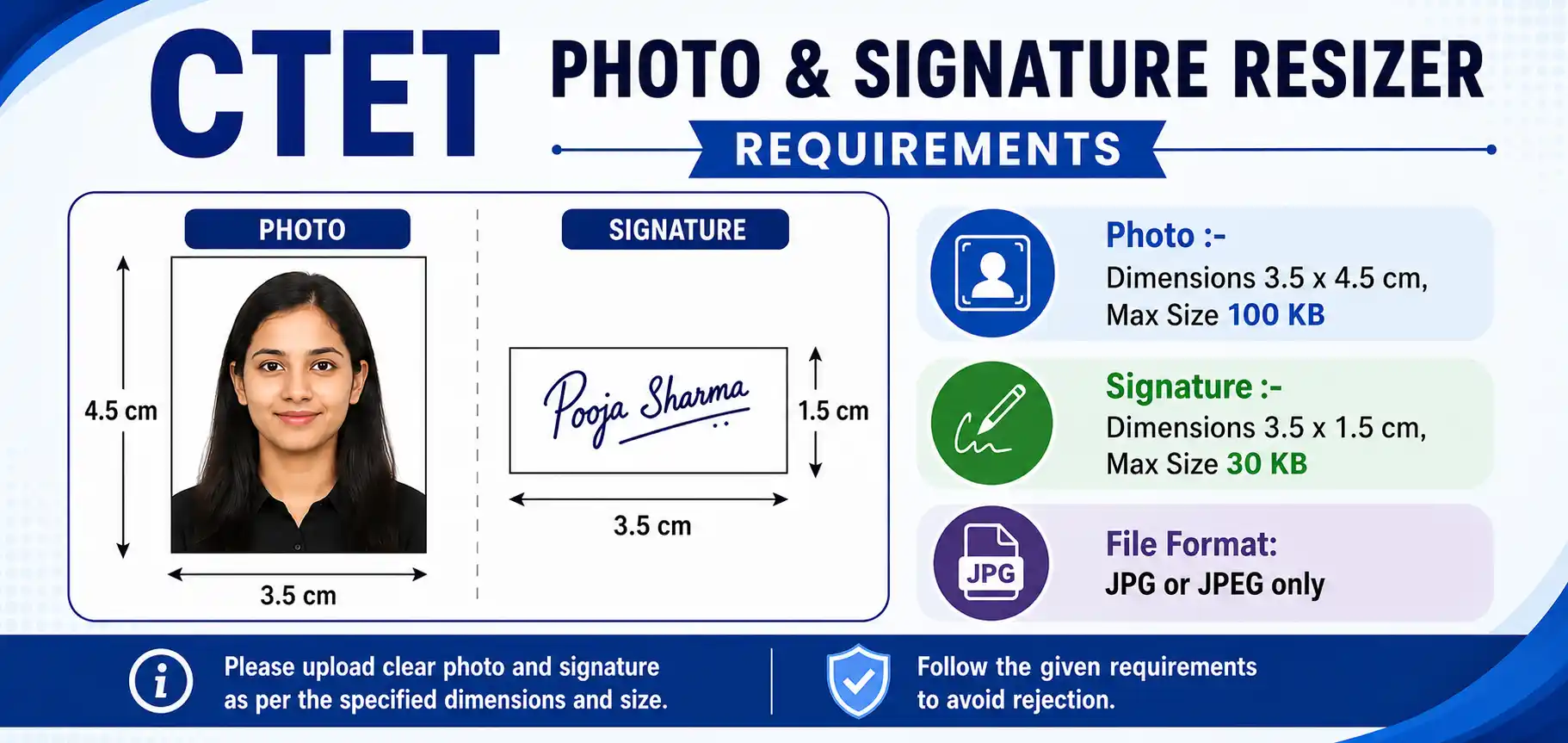
CTET Photo & Signature Dimensions 2026 – Exact Size Requirements
Before uploading your images to the official CTET portal, it's essential to verify that they adhere to the technical specifications. Even a minor deviation from the prescribed dimensions or file capacity could trigger an error. Below are the CTET photo and signature dimensions 2026 as per official CTET image upload guidelines.
| Image Type | Dimensions (cm) | File Size | Format |
|---|---|---|---|
| Photo | 3.5 × 4.5 cm | Max 100 KB (min 10 KB) | JPG/JPEG |
| Signature | 3.5 × 1.5 cm | Max 30 KB (min 3 KB) | JPG/JPEG |
📄 These parameters are derived from the official CTET information bulletin. For authoritative reference, visit the CTET official website.
Resize CTET Photo (10 KB to 100 KB) – 3.5 × 4.5 cm
If your photograph is larger than the allowed limit, you need to CTET photo compress to 100kb without losing clarity. This tool lets you CTET photo resize 10 to 100 kb precisely, keeping the 3.5 × 4.5 cm aspect ratio intact. Whether your original image is 500 KB or 2 MB, the resizer brings it down to the official bracket in seconds.
Resize CTET Signature (3 KB to 30 KB) – 3.5 × 1.5 cm
Signatures are often scanned at high resolution, making them too heavy for the portal. Use the CTET signature resizer 3 to 30 kb feature to CTET signature compress to 30kb while preserving the stroke clarity. The tool also handles resize CTET signature 3.5 x 1.5 cm dimensions automatically, so you don't need separate editing software.
CTET Photo and Signature Joiner Tool
Some candidates prefer a single combined image for upload. The CTET photo and signature joiner tool allows you to merge both into one JPG file while maintaining the individual size limits. This is especially useful when the portal accepts a single attachment or when you want to keep your files organized. The joiner respects all official dimensions and compression rules.
How to Resize Photo for CTET (Step-by-Step Guide)
- Select your photograph or signature file using the upload interface
- Fine-tune the compression level to match CTET's file size bracket (10–100 KB for photo, 3–30 KB for signature)
- Inspect the preview to confirm sharpness and proper scaling (3.5 × 4.5 cm or 3.5 × 1.5 cm)
- Hit the download button to store the optimized version
How to Resize Photo for CTET Form on Mobile
No computer? No problem. Here's how to resize photo for CTET form on mobile:
- Open this CTET Photo Resizer page in your mobile browser (Chrome, Safari, etc.)
- Tap the upload button and choose your photo or signature from the gallery
- Adjust the compression slider until the file size falls within 10–100 KB (photo) or 3–30 KB (signature)
- Preview the image, then tap Download — the resized file saves directly to your phone
- Upload the downloaded JPG to the official CTET portal
Works on all Android and iOS devices — no app install needed.
Explore additional utilities like CCC Photo Resizer, DSSSB Photo Resizer, UPSSSC Photo Resizer, and NEET Photo Resizer for other competitive examinations.
CTET Photo Background Color Requirement
The CTET photo background color requirement is often overlooked. As per official guidelines, the photograph should have a plain light-coloured or white background. Dark backgrounds, patterned walls, or busy scenes can lead to rejection. Ensure your face is clearly visible against the backdrop, with no shadows falling on the background. If your existing photo has a dark background, consider retaking it before using the resizer.
CTET Photo Upload Problem Solution & Rejection Reasons
Many candidates face the frustrating CTET photo upload problem during form submission. Here's a quick CTET photo upload problem solution guide:
❌ Common CTET Photo Rejection Reasons
- File size exceeds 100 KB (photo) or 30 KB (signature)
- File size below the minimum (10 KB / 3 KB) — some portals reject tiny files
- Wrong format — PNG, WebP, or GIF instead of JPG/JPEG
- Incorrect dimensions — not 3.5 × 4.5 cm or 3.5 × 1.5 cm
- Blurry, pixelated, or low-resolution image
- Dark or patterned background instead of plain light background
- Face not clearly visible or covered by accessories
✅ Quick Fixes for Upload Errors
- Re-run the image through this resizer and set the exact KB range
- Convert to JPG using the tool's format conversion feature
- Check the aspect ratio — use the preset for 3.5 × 4.5 cm or 3.5 × 1.5 cm
- Retake the photo with a plain white or light background
- Ensure the signature is on white paper with black or blue ink
- Clear browser cache or try a different browser if the portal still errors
- Download the resized file and upload again — do not rename to unusual characters
⚠️ Frequent Mistakes with CTET Image Uploads
- Exceeding the maximum file size limit
- Submitting PNG or WebP instead of mandatory JPG
- Grainy or pixelated photographs
- Incorrect aspect ratio — not matching 3.5×4.5 cm or 3.5×1.5 cm
If you encounter these issues, re-run your images through this resizer for a quick fix.
💡 Best Practices for Flawless Submission
- Always use a recent, well-lit frontal photograph
- Opt for a plain, light-colored backdrop
- Avoid hats, sunglasses, or heavy shadows
- Keep your facial features unobstructed
- Strictly adhere to JPG format
🏆 Advantages of Choosing This CTET Photo Resizer
- Completely complimentary and straightforward
- Zero learning curve — anyone can operate it
- Real-time processing with immediate output
- Preserves original clarity during compression
- Responsive design for all screen sizes
⚡ Notable Features
- Accurate dimensions as per CTET directives
- Intelligent file size reduction without degrading visuals
- Seamless conversion from other formats to JPG
- One-click download post-processing
🔒 Privacy-Centric & Reliable
This CTET Photo Resizer functions entirely within your browser's sandbox. No image data is ever transmitted to any server, guaranteeing absolute confidentiality for every user.
📄 Ideal Scenarios for This Tool
- CTET Paper 1 & Paper 2 application forms
- Other teacher eligibility tests and recruitment portals
- Identity verification and document submission
- Updating profile images on official portals
🇮🇳 Hinglish Guide: CTET Form Ke Liye Photo Resize Kaise Kare?
CTET form ke liye photo resize kaise kare — yeh sawal bahut candidates puchte hain. Is tool ka use karke aap apni photo ko 10 KB se 100 KB ke beech aur signature ko 3 KB se 30 KB ke beech easily la sakte hain.
CTET signature resize kaise kare — bas apni signature ki image upload karein, compression slider ko adjust karein, aur download button dabayein. Aapki signature 3.5 × 1.5 cm mein resize ho jayegi.
Mobile ya computer — dono par yeh tool perfectly kaam karta hai. Koi app download karne ki zaroorat nahi. CTET photo compress to 100kb aur CTET signature compress to 30kb — sab kuch browser mein hi ho jata hai, bina kisi data leak ke.
Frequently Asked Questions (FAQs)
The photograph should measure 3.5 × 4.5 cm with a file size between 10 KB and 100 KB, saved in JPG/JPEG format. This is as per the CTET photo and signature dimensions 2026.
The signature must be 3.5 × 1.5 cm with a file size between 3 KB and 30 KB in JPG/JPEG format. Use the CTET signature resizer 3 to 30 kb feature to meet this requirement exactly.
Absolutely. The tool allows you to control compression levels to hit the desired file size bracket with ease. You can CTET photo resize 10 to 100 kb and CTET signature resize 3 to 30 kb precisely.
Common CTET photo rejection reasons include: file size outside the 10–100 KB (photo) or 3–30 KB (signature) range, wrong format (PNG/WebP instead of JPG), poor resolution, incorrect dimensions, dark or patterned background, and covered facial features. Re-running your image through this resizer usually fixes the issue.
The CTET photo background color requirement specifies a plain light-coloured or white background. Avoid dark, patterned, or busy backgrounds. Shadows on the background should be minimal. For signatures, use plain white paper with black or blue ink.
If your CTET photo upload fails, first check the file size and format. Resize the image to 10–100 KB (photo) or 3–30 KB (signature) using this tool, ensure it's JPG, and verify the dimensions. Clear your browser cache, try a different browser, or rename the file with simple characters. If the problem persists, re-download the resized image and upload again.
Open this page on your mobile browser, upload your photo, adjust the compression slider to 10–100 KB, preview, and download. The resized JPG saves to your phone gallery, ready for upload. No app installation is required. See the step-by-step mobile guide above for details.
Yes. Since all operations are performed locally in your browser, your images are never uploaded or stored elsewhere. This CTET Photo Resizer is fully client-side and privacy-centric.
Ready to Finalize Your CTET Application Images?
The CTET Photo Resizer offers a dependable and swift approach to preparing your visual documents. Properly formatted photographs and signatures are non-negotiable for a successful CTET application. Leveraging this dedicated utility ensures your files comply with every technical parameter, significantly reducing the risk of rejection.
What makes this tool stand out:
✓ Lightning-fast resizing · ✓ Crystal-clear output · ✓ Fully client-side · ✓ Zero uploads · ✓ Always free
Optimize your CTET photo and signature online at no cost and proceed with your application stress-free. No sign-ups, no watermarks, no surprise charges — just a straightforward, efficient tool you can rely on.