
🔄 What is a Text Reverser?
A Text Reverser is a free online tool that instantly flips the order of characters, words, sentences, or entire paragraphs. It supports multiple reversal modes including full reverse, word reverse, sentence reverse, paragraph reverse, and mirror text generation.
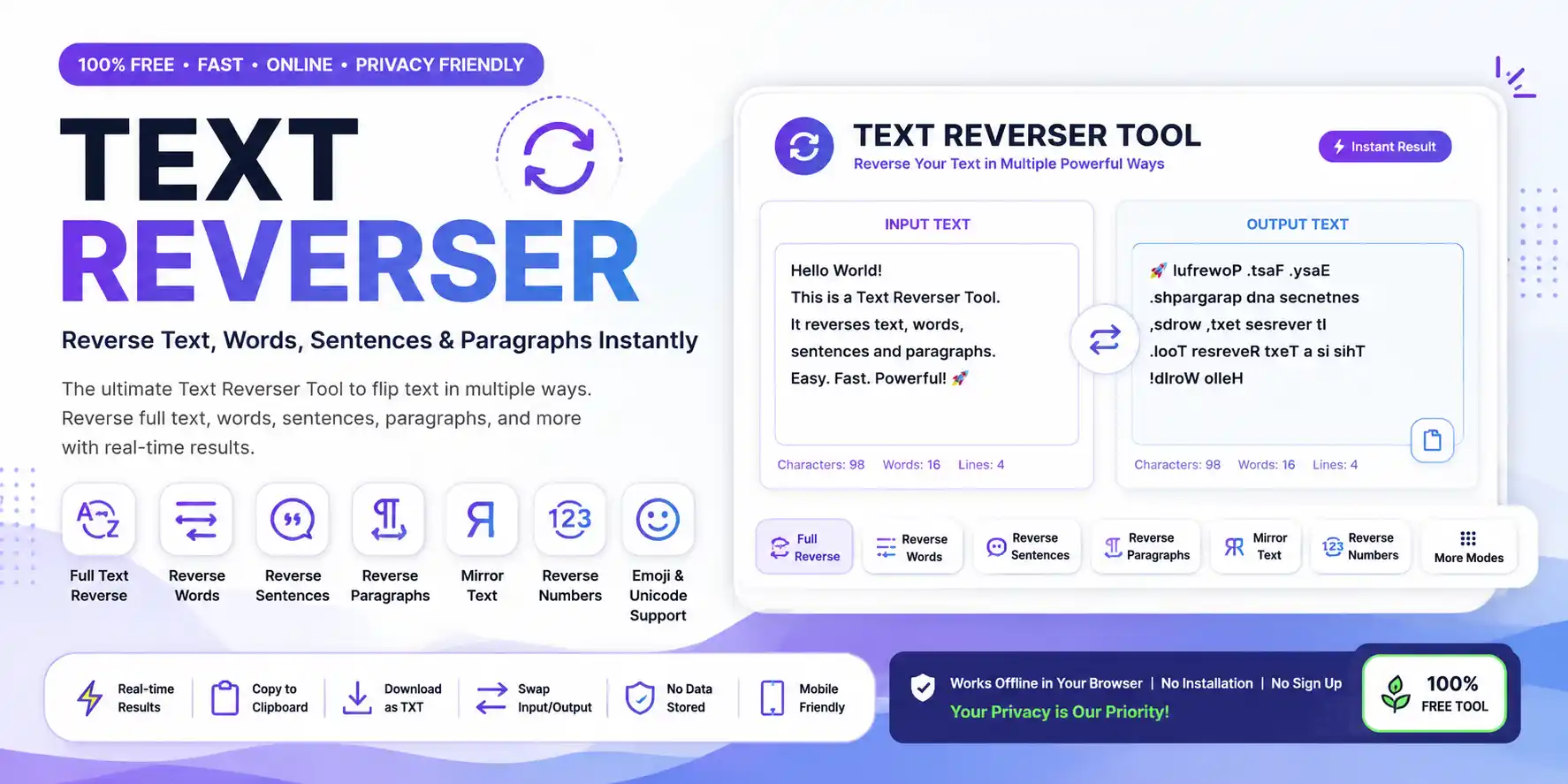
A Text Reverser is an essential reverse text generator designed to save you time and effort when you need to flip text, words, or sentences. Whether you're a content creator crafting engaging social media posts, a developer testing string manipulation, or a student learning about word order, a backward text converter can be your best friend. Our Text Reverser Online tool allows you to reverse text online instantly, with support for full text reversal, word reversal, sentence reversal, paragraph reversal, and even mirror text generation. To learn more about text processing fundamentals, check out Wikipedia's comprehensive guide to text processing.
Unlike manual reversal which is tedious and error-prone, a word reverser like ours ensures perfect text transformation every single time. You can reverse text, reverse words only, or reverse sentences with just a few clicks. The mirror text tool functionality means you can generate creative backward writing for typography experiments, social media content, or puzzle creation in milliseconds, not minutes. This online utility tool is perfect for anyone who needs to reverse paragraphs, reverse each word's characters, or create backward text for fun messages.
Our reverse text generator is completely free, works entirely in your browser, and respects your privacy — no data is ever stored or transmitted to our servers. With real-time updates, Unicode support for emojis and special characters, and one-click copy/download/swap features, it's the most comprehensive backward text converter and mirror text tool available online.
📘 How to Use the Text Reverser Tool?
Step 1: Enter any text in the Input Text area — you can type manually or paste content from any source.
Step 2: Choose your reversal mode from the toolbar: Full Reverse, Reverse Words, Sentence Reverse, Paragraph Reverse, Mirror Text, Backward Writing, Reverse Case, or Reverse Numbers.
Step 3: Watch the reversed text appear instantly in the Output panel — no page reload needed, real-time text reversal.
Step 4: Use the action buttons to copy reversed text to clipboard, Download as TXT file, or Swap Input ↔ Output. You can also use our complementary Word Counter to analyze your text or the Character Counter for precise length measurement.
Pro Tip: Click on any example tag (e.g., "Reverse a sentence", "Reverse a paragraph") to instantly load sample text and see the tool in action! For more keyboard shortcuts, visit Microsoft's official keyboard shortcuts guide.
✨ Features of Our Text Reverser Tool
✅ 8 Reverse Modes - Full, Words, Sentences, Paragraphs, Mirror, Backward, Case, Numbers
✅ Real-time generation - Output updates as you type
✅ One-click copy - Copy reversed text to clipboard instantly
✅ Download as TXT file - Save your reversed text offline
✅ Swap Input/Output - Quickly switch between original and reversed text
✅ Live character, word & line counts - Track input and output size
✅ Unicode & Emoji Support - Reverse emojis, Hindi, Urdu, Arabic, Chinese, Japanese
✅ Clickable Examples - Load sample text with one click
✅ Reading Time Estimation - Know how long your text takes to read
✅ Mobile-responsive - Works on all devices
✅ Zero data storage - 100% privacy focused
✅ No registration or login - Use instantly, completely free
📋 Text Reverser Examples
See how our Text Reverser Online tool works with these practical examples. You can try any of these patterns instantly:
📝 Full Reverse
Input: "Hello World"
Output: "dlroW olleH"
Perfect for backward text generator demonstrations
📄 Reverse Words
Input: "Hello World"
Output: "World Hello"
Great for creating word reverser transformations
🔄 Mirror Text
Input: "Hello"
Output: "olleH"
Perfect mirror text tool for typography experiments
😊 Reverse with Emojis
Input: "🎉 Hello World 🎉"
Output: "🎉 dlroW olleH 🎉"
Showcases emoji reverse support for Unicode text
🎯 Common Uses of Text Reverser
📱 Social Media Content - Create eye-catching reverse text posts
🎭 Fun Messages - Send playful backward texts to friends
🤫 Secret Messages - Encode private notes for puzzle lovers
💻 Coding & Debugging - Test string manipulation functions
🧪 Data Testing - Generate reverse strings for QA testing
🌍 Language Learning - Practice reading text backwards
🧩 Puzzle Creation - Create word games and treasure hunts
✒️ Typography Experiments - Explore mirror text effects
💡 Benefits of Using a Text Reverser Tool
🚀 Boost Productivity: Save hours of manual text reversal. Instead of typing backwards character by character, our reverse text generator does it in milliseconds.
✅ Ensure Consistency: Perfect for generating test data, creative content, or puzzle clues without errors. Every text transformation is perfect.
💰 100% Free: No hidden charges, no premium tiers, no credit card required. Use this backward text converter as much as you want.
🔒 Privacy-First: Zero data upload — everything runs locally in your browser. Your text never leaves your device.
📱 Mobile-Responsive: Works perfectly on phones, tablets, and desktops. The compact interface adapts to touch screens.
♿ Accessibility Compliant: Built with semantic HTML and keyboard navigation support for all users. For more information on web accessibility standards, visit W3C's Web Accessibility Guidelines (WCAG).
⚡ Text Reverser vs Manual Reversal: Which is Better?
✅ Using Text Reverser Online
Instant generation, 100% accurate, handles long texts in seconds, supports multiple modes, no typos, Unicode support.
❌ Manual Reversal
Time-consuming, error-prone, limited to short texts, causes hand fatigue, inconsistent results, no Unicode support.
The conclusion is clear: a dedicated reverse text generator like our Text Reverser Online tool dramatically outperforms manual methods in every measurable category.
🏆 Why Choose Our Text Reverser?
🎨 Modern Design: Clean, professional interface with smooth animations and premium typography.
📦 Comprehensive Modes: 8 reversal modes including Full Reverse, Reverse Words, Sentence Reverse, Paragraph Reverse, Mirror Text, Backward Writing, Reverse Case, and Reverse Numbers.
⚡ Blazing Fast Performance: Optimized for Core Web Vitals with instant DOM updates.
🌐 Unicode Support: Full support for emojis, Hindi, Urdu, Arabic, Chinese, Japanese, and all UTF-8 characters.
🔧 No Registration, No Ads: Get straight to work without annoying popups or signup forms. This backward text converter is ready when you are.
👥 Who Uses a Text Reverser Tool?
🎓 Students
Learn about word order, sentence structure, and character encoding through hands-on practice. Use our Text Repeater for additional study tools.
📱 Social Media Creators
Generate engaging reverse text captions, mirror text effects, and creative content for Instagram, TikTok, and Twitter.
💻 Developers
Test string manipulation functions, debug Unicode handling, and generate test data. Try our Case Converter for text formatting.
🎨 Designers
Create mirror text effects and typography experiments for logos and creative projects. Use our Fancy Text Generator for creative typography.
🧩 Puzzle Creators
Generate reverse text clues for word games, treasure hunts, and escape room challenges.
🌍 Language Learners
Practice reading backwards in different scripts, study word order, and create mnemonics.
❓ Frequently Asked Questions About Text Reverser Tools
1. What is a Text Reverser?
A Text Reverser is an online tool that instantly flips the order of characters, words, sentences, or paragraphs in any input text. It supports multiple reversal modes for different use cases.
2. How does text reversal work?
Text reversal works through JavaScript string manipulation that splits text into units based on the selected mode, reverses their order, and rejoins them with appropriate separators. All processing happens client-side in your browser.
3. Can I reverse words only?
Yes. The "Reverse Words" mode reverses the order of words while keeping each word's characters in their original order. "Hello World" becomes "World Hello".
4. Does it support emojis and special characters?
Absolutely. The tool fully supports emojis, symbols, and Unicode characters, including Hindi, Urdu, Arabic, Chinese, and Japanese scripts.
5. Is my text stored or shared?
No. All processing occurs locally in your browser. Your text never leaves your device and is not stored or shared.
6. Can I reverse paragraphs?
Yes. The "Paragraph Reverse" mode reverses the order of paragraphs while preserving the internal structure of each paragraph.
7. Is this tool free?
Yes. The Text Reverser is completely free to use with no registration, subscriptions, or usage limits.
8. Does it work on mobile devices?
Yes. The tool is fully responsive and works seamlessly on smartphones, tablets, and desktop browsers.
9. What Unicode scripts are supported?
The tool supports all UTF-8 character sets including Latin, Cyrillic, Devanagari, Arabic, Chinese, Japanese, and other writing systems.
10. Is there a character limit?
While there's no strict character limit, extremely large texts (over 1MB) may affect performance. For typical use cases, thousands of characters process instantly.
11. Can this help with SEO?
Yes. Content creators use Text Reversers to generate unique content variations, test keyword placement, and create creative meta descriptions for A/B testing.
12. Can I use it for programming?
Yes. Developers use Text Reversers to test string manipulation functions, validate Unicode handling, generate test data, and practice algorithm implementation.
13. What are educational uses?
Teachers use Text Reversers to demonstrate word order, sentence structure, character encoding, and language concepts in classroom settings.
14. Is my data private?
100% private. No data is stored, logged, or transmitted. All processing runs locally in your browser.
15. How fast is the processing?
Processing is instantaneous for typical text lengths. The tool is optimized for client-side performance with minimal latency.
16. Can I download the reversed text?
Yes, click the "Download TXT" button to save your reversed text as a text file for offline use.
17. Does it support mirror text generation?
Yes! The "Mirror Text" mode creates a mirrored effect that's perfect for typography experiments, creative design projects, and social media content.
🔧 Related Tools You Might Like
Enhance your text editing experience with these complementary online utilities:
Want to analyze your text length? Try our Character Counter or Word Counter. For text transformation, check out our Case Converter and Text Repeater tools.