
Passport Size Photo Maker Online Free
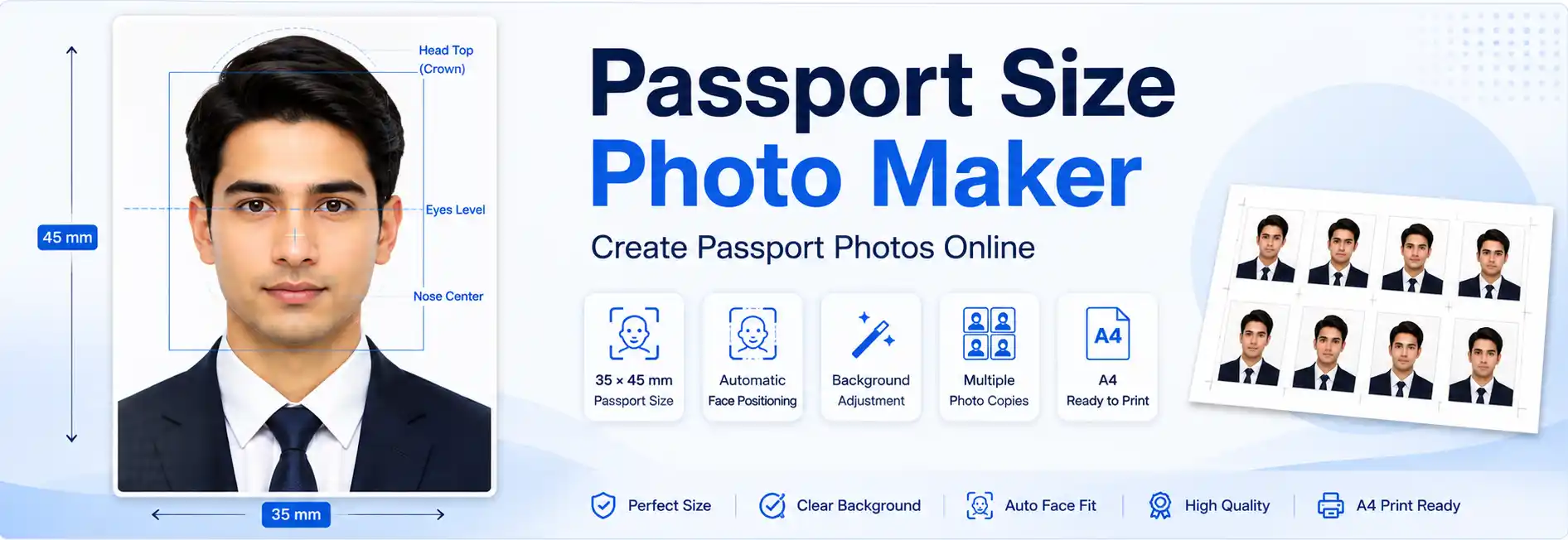
A passport size photo maker online free tool helps you prepare passport-style photographs without professional photo-editing software. Upload a clear photo, select the required dimensions, adjust the face position and review the result before downloading.
Use this online passport photo maker to prepare supported formats such as 35 × 45 mm and 2 × 2 inches. You can also use the available background options and arrange multiple photo copies on an A4 print layout.
Always check the current photo requirements for your particular passport, visa, examination or ID application before submitting the finished image.
Make Passport Size Photo Online Free
You can make a passport size photo online by cropping and positioning an existing photograph to match the dimensions required by your application. The editor helps you prepare the image in a few steps, whether you need a digital photo or a printable sheet.
Depending on the features available in the editor, you can:
- Select a supported passport photo size.
- Crop and scale your photograph.
- Use AI Auto Fit to assist with face positioning.
- Adjust the background when necessary.
- Review the image before downloading.
- Prepare multiple copies for A4 printing.
Start with a recent, clear, front-facing photograph taken in even lighting. The better the original image, the easier it is to prepare a suitable final result.
Passport Photo Maker Features
AI Auto Fit for Face Positioning
AI Auto Fit helps position and scale a detected face within the selected photo frame. It can simplify the initial cropping process and reduce the amount of manual adjustment required.
After using Auto Fit, check the face position, head size, eye alignment and space above the head. Face detection may not work perfectly in every photograph, particularly when the face is obscured, poorly lit or turned away from the camera.
If the automatic result is not suitable, use the editor's manual controls where available.
Passport Photo Background Adjustment
A suitable background is an important part of many passport and visa photo requirements. The editor's background adjustment options can help you prepare an image with the desired appearance.
Inspect the result around the hair, ears and shoulders. Look for leftover background areas, rough edges, shadows or unnatural cutouts. A background that looks clean on screen does not necessarily mean the photograph meets every official requirement.
Use only background changes permitted by the authority or application requesting your photograph.
Multiple Photo Sizes and A4 Printing
Different applications require different photo dimensions. Choose the format that matches your instructions instead of assuming one passport photo size is suitable everywhere.
If you need physical photographs, use the available A4 print layout to arrange multiple copies. Before printing, check the spacing, orientation and intended physical dimensions.
How to Make a Passport Size Photo
Follow these steps to make a passport size photo online:
- Choose a clear photograph. Use a recent, front-facing image with even lighting, a natural expression and a clear view of your face.
- Select the required size. Choose the dimensions specified by your passport, visa, ID or other application.
- Position your face. Use AI Auto Fit if available, then adjust the crop manually if needed.
- Check the background. Use a suitable background option only if the application permits it.
- Review the final image. Check the face position, head size, lighting, image clarity and dimensions.
- Download or print. Save the prepared photo or arrange multiple copies using the A4 print layout.
Important: Automatic cropping and correct dimensions cannot guarantee acceptance. The final photograph must also meet the relevant authority's rules for facial appearance, background, lighting and image quality.
Passport Photo Size in mm, Inches and Pixels
Passport photo requirements vary by country and application. The following table provides a general reference for common formats, not a universal list of accepted specifications.
| Photo Format | Physical Dimensions | Important Information |
|---|---|---|
| 35 × 45 mm | 3.5 × 4.5 cm | Used by various passport, visa and ID applications. |
| 2 × 2 inches | Approximately 51 × 51 mm | Used for US passport photos and certain other applications. |
| Custom photo size | As specified | Follow the exact width and height required by the application. |
Pixel dimensions depend on the required physical size and resolution. For example, a 35 × 45 mm image at 300 DPI is approximately 413 × 531 pixels. This is a mathematical conversion, not a guarantee that those pixel dimensions meet every application's requirements.
For digital submissions, also check the required file format, maximum file size, aspect ratio and any minimum pixel dimensions.
Indian Passport Size Photo Requirements
If you need an Indian passport photograph, check the instructions for your specific application before selecting a photo size. Requirements may differ depending on whether the photograph is intended for an online application, a printed document or another process.
Before submitting your photograph, verify:
- The required photo dimensions and image format.
- Whether a photograph must be uploaded digitally or supplied in print.
- The permitted background, lighting and facial expression.
- Any requirements for head position, image clarity and file size.
Visit the official Passport Seva website to check the latest applicable instructions. Do not assume that a generic 35 × 45 mm template is accepted for every Indian passport-related process.
2 × 2 Inch Passport Photo
A 2 × 2 inch photograph measures approximately 51 × 51 mm. This format is associated with US passport photographs and certain visa applications.
If you need a US passport photo, follow the current official requirements for the specific application. These may cover the photograph's physical or digital dimensions, head size, background, facial expression, lighting and recency.
For authoritative guidance, consult the US Department of State passport photo requirements.
Digital Passport Photos vs Printed Photos
A digital passport photograph and a printed passport photograph are not exactly the same thing. A digital file is measured in pixels, while a printed image has physical dimensions such as millimetres or inches.
- Pixel dimensions: The width and height of the digital image.
- Physical dimensions: The actual printed width and height.
- DPI: A measure associated with print resolution.
- File size: The amount of storage space occupied by the image, commonly measured in KB or MB.
Changing DPI metadata alone does not create additional image detail. Similarly, reducing a photograph's file size does not necessarily change its physical dimensions. Check all the specifications required for your intended use.
How to Print Multiple Passport Photos on A4 Paper
If your application requires printed photographs, an A4 layout can help arrange multiple copies on one sheet.
- Prepare and review your passport photograph.
- Select the required photo dimensions.
- Arrange multiple copies using the available print layout.
- Check the spacing and layout before printing.
- Print on A4 paper using the appropriate printer settings.
- Measure a printed copy to confirm its physical size.
When exact physical dimensions matter, avoid printer settings such as “Fit to Page” if they resize the layout. Select the appropriate actual-size or 100% scaling option where available, and verify the printed dimensions with a ruler.
Common Passport Photo Mistakes to Avoid
Before using your finished photograph, check for these common problems:
- Incorrect photo dimensions or aspect ratio.
- The face being too large, too small or poorly positioned.
- Insufficient space above the head where the application specifies a margin.
- Shadows, uneven lighting or a blurry face.
- Unnatural background removal or visible cutout edges.
- Filters or edits that significantly change your appearance.
- Incorrect file format or file size for digital submission.
- Printer scaling that changes the intended physical dimensions.
AI-assisted positioning can make photo preparation easier, but you should always inspect the final image yourself.
Frequently Asked Questions
Yes. You can use the online editor to prepare a supported photo size, adjust the image, review the result and download the finished photograph without using professional photo-editing software.
There is no single size used for every country. Formats such as 35 × 45 mm and 2 × 2 inches are used by different applications. Always select the dimensions required for your particular application.
Yes, if the editor supports that format. Select 35 × 45 mm, adjust the face position and verify the final dimensions and other requirements before using the photograph.
You can prepare this format if it is supported by the editor. A 2 × 2 inch photo is approximately 51 × 51 mm. Check the official requirements for the application that needs it.
AI Auto Fit can assist with detecting, positioning and scaling a face. Results may vary depending on the original photograph, so review and manually adjust the image if necessary.
The editor provides background adjustment options. Choose an option permitted by your application and inspect the hair, shoulders and edges for visible errors.
You can use the available A4 print layout to arrange multiple copies. Check the photo dimensions and printer scaling before printing to ensure that the physical size remains correct.
DPI relates to print resolution. Changing DPI metadata alone does not increase the number of pixels or improve image detail. Follow the required pixel dimensions and print specifications for your application.
No. The authority may also check the background, head size, facial expression, lighting, image quality and other requirements. Always review the current official instructions before submitting your photograph.
Create Your Passport Size Photo Online
A passport size photo maker can simplify the process of cropping, positioning and preparing photographs for different applications. Choose the correct dimensions, use AI Auto Fit where helpful, adjust the background only when permitted, and inspect the final image before downloading or printing.
For the best results, start with a clear photograph and follow the latest official requirements for your passport, visa or ID application.